I now have 5 projects. shop, blog, code_dungeon, good_game, and a root that manages them all (that’s not its actual name). Each project runs its own Claude session. The problem is there’s only one of me.
If I kick off a task in shop and switch to editing a draft in blog, I have no idea when shop finishes. If I start Phase 1 in code_dungeon and go check on good_game, code_dungeon might be stuck waiting for permission and I wouldn’t know. Staring at 5 terminals in rotation isn’t monitoring. It’s just eye strain.
I need alerts.
Why Discord Webhooks
Slack exists. Telegram exists. I picked Discord. The reason is simple: you can create unlimited channels for free. One channel per project means alerts don’t mix. root-alerts, shop-alerts, blog-alerts, code_dungeon-alerts, good_game-alerts. One webhook URL per channel.
I stored each webhook URL in .claude/.discord-webhook inside each project. Hardcoding URLs in scripts means editing the script every time a project is added, but with separate files, I just create a new webhook file.
First Hook: Alert on Completion
I wired a Discord notification script to the Stop hook. When a session ends, it sends the project name and timestamp to Discord.
| |
The Stop hook runs async. When multiple hooks run simultaneously, there’s no guarantee which one gets stdin. INPUT=$(cat) at the very top of the script captures it immediately.
Every Stop Reason Was “unknown”
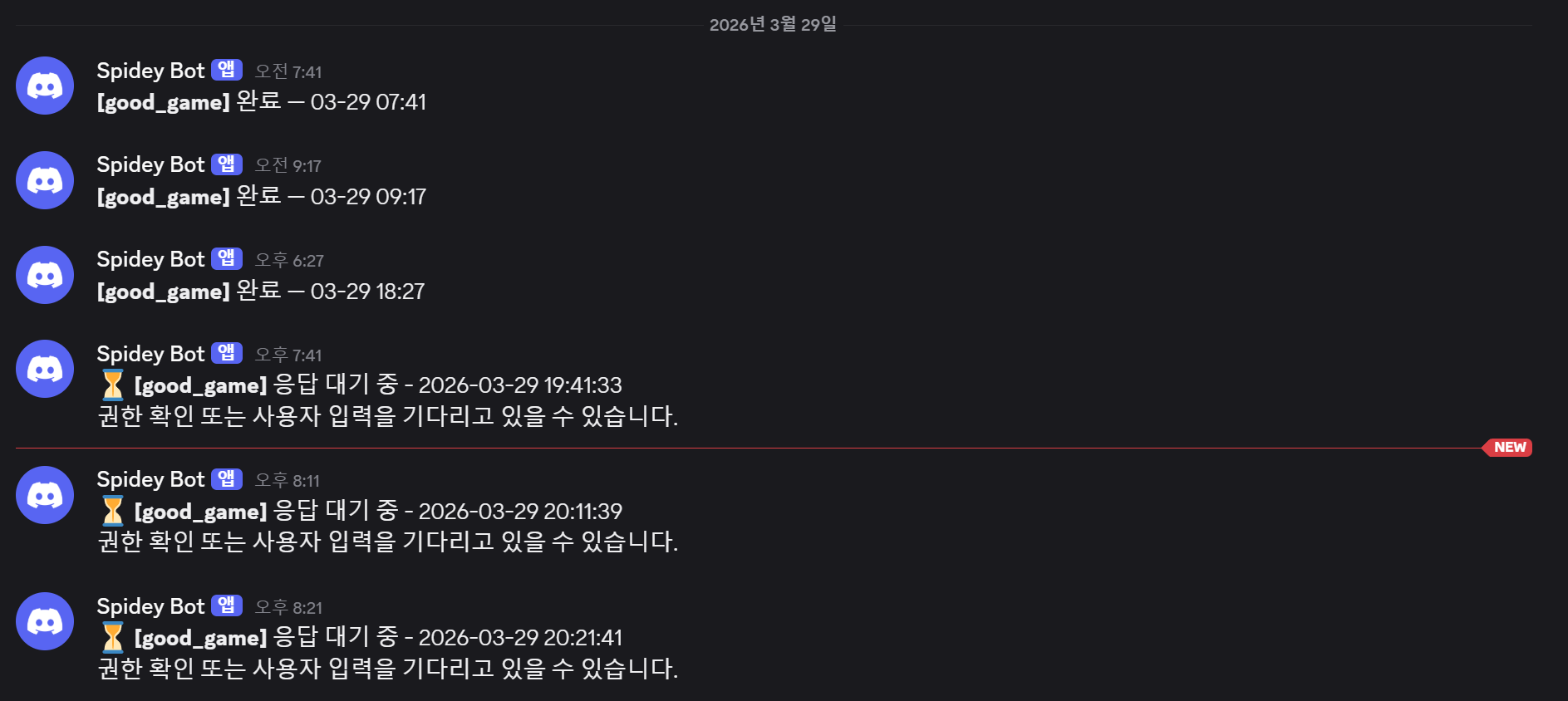
Alerts started coming in, but every single one said “unknown.” [shop] unknown — 03-28 18:01. I know it finished, but not why. Normal completion? Token overflow? Refusal?
I dug into the Stop hook payload. No stop_reason field. The JSON that Claude Code passes to hooks doesn’t include the session termination reason.
I found a workaround. The payload has transcript_path — the path to a JSONL file containing the entire session transcript. It looks like this:
{"type":"user","message":{"role":"user","content":"Change the project path"},...}
{"type":"assistant","message":{"role":"assistant","content":[{"type":"text","text":"..."}],"stop_reason":"end_turn",...},...}
One line per event, and assistant messages contain the stop_reason field. I rewrote the script to traverse this file in reverse and extract the last stop_reason.
| |
There are 7 possible stop reasons. I mapped each to a Korean label.
| stop_reason | Alert Label |
|---|---|
| end_turn | 완료 (Complete) |
| max_tokens | 토큰초과 (Token Overflow) |
| model_context_window_exceeded | 컨텍스트초과 (Context Overflow) |
| stop_sequence | 중단시퀀스 (Stop Sequence) |
| pause_turn | 일시정지 (Paused) |
| refusal | 거부 (Refused) |
| tool_use | 도구호출 (Tool Call) |
Now I get alerts like [shop] 완료 — 03-28 18:01 and [blog] 토큰초과 — 03-28 15:32.
Filtering Sub-agent Alerts
A completion alert came through, so I checked the terminal — still running. I added debug logging and investigated. The cause was sub-agent parallel tasks completing.
Here’s the task processing structure I set up for the shop project:
Customer Request
  → task-orchestrator (main)
      ├─ frontend-developer   → UI implementation
      ├─ backend-developer    → API implementation
      ├─ code-reviewer        → Code review + performance check
      ├─ security-auditor     → Security audit (conditional)
      └─ quality-gatekeeper   → Final verification
Every time a sub-agent finishes, the Stop hook fires. Even though the main session hasn’t ended. If 5 sub-agents are attached to one task, that’s 6 alerts. frontend-developer complete, backend-developer complete, code-reviewer complete… meanwhile the main session is still going.
If the payload has an agent_id field, it’s a sub-agent. I added a filter to skip both alerts and heartbeat deletion for sub-agents.
| |
Completion Alerts Aren’t Enough
When Claude requests permission confirmation, asks for file write access, or waits for user input, the Stop hook doesn’t fire. “This task must be taking a while,” I thought, waiting — then checked and found it had been waiting for my response for dozens of minutes.
Second Hook: Waiting Alert
The idea is simple. Every time Claude executes a tool, it writes a timestamp. If the timestamp hasn’t been updated for 2 minutes, the project is considered stalled.
I connected a heartbeat script to the PostToolUse hook. Every tool execution writes the current time to .claude/.heartbeat.
| |
That’s it. A one-line hook.
A separate watcher script checks all 5 projects’ heartbeat files every 60 seconds. If the last update was more than 2 minutes ago, it sends a “waiting” alert to Discord. No re-alerts within 10 minutes for the same project. Otherwise it’s alert spam.
| |
When a session ends, the Stop hook deletes the heartbeat file. This prevents “waiting” alerts for projects that have already finished.
Now only main session completion alerts come through.
Current Setup
Two hooks and one watcher script.
| Component | Trigger | Role |
|---|---|---|
| heartbeat.sh | PostToolUse | Update timestamp on every tool execution |
| notify-discord.sh | Stop | Discord alert on session end + delete heartbeat |
| watcher.ps1 | 60s interval (always running) | “Waiting” alert when heartbeat stale > 2min |
| .discord-webhook | — | Per-project webhook URL storage |
Adding a new project takes two steps: put the webhook URL in .claude/.discord-webhook and add the path to the watcher.ps1 PROJECTS array.
5 projects are running simultaneously. Discord alerts are firing. At least now I know which one is stuck.
Something I Read After Building This
There’s a post called 50 Practical Tips for Claude Code with this item:
48. Play a sound when Claude finishes — Register a system sound via Stop Hook. Start a task, switch to other work, get a ping when it’s done.
If you only work locally, that seems like enough.
Related posts